Token Marketplace & P2P Trading Guide
- Token Marketplace Overview
- Searching & Buying Tokens
- Safe Buying Process
- Registering as a Seller
- Safe Token Transfer & Timed-Lock Guide
- Dispute Resolution Process
Token Marketplace Overview
The Token Marketplace at Traffic4SEO connects Token Buyers (who need tokens to run automated SEO workflows) directly with Token Sellers (who run workflows on their devices to earn tokens).
The Marketplace operates as a public listing platform:
- The platform purely provides seller profile listings and a safe technical token transfer tool.
- Both parties freely agree on direct cash/fiat payments outside the system.
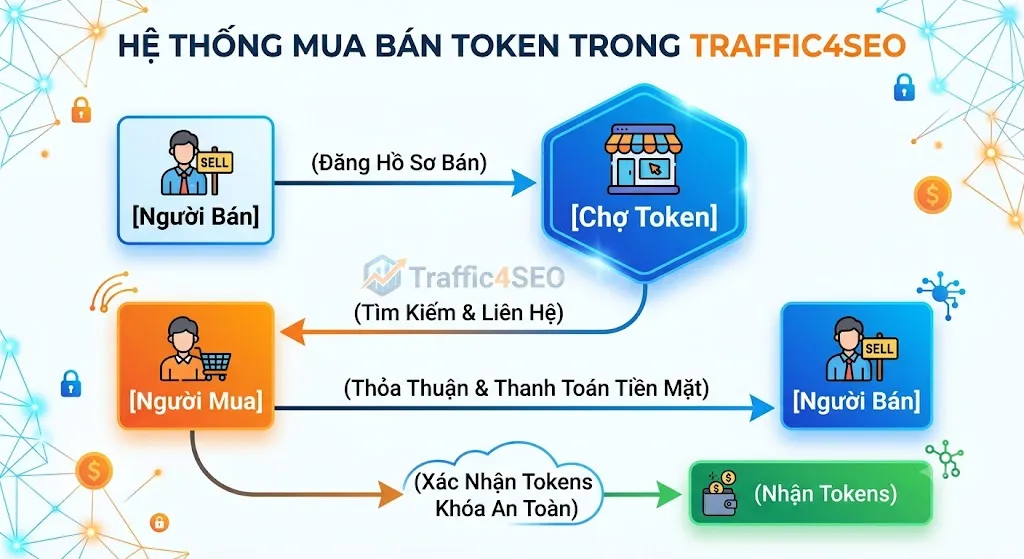
{info} Important Note About Tokens: Tokens in the system are internal electronic utility credits used to run automation tools. Tokens are not currency, financial assets, or cryptocurrency. The platform does not charge any cash commission fee on P2P trading between users.
Searching & Buying Tokens
To buy tokens, navigate to the Marketplace page from the main menu.
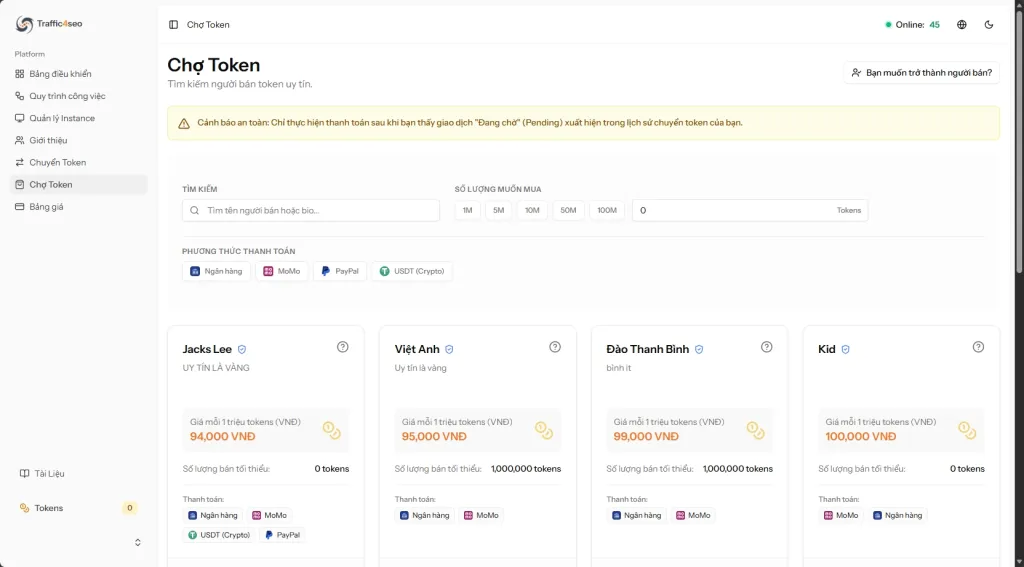
Search & Filter Tools
- Search Bar: Enter seller brand names or keywords related to services you are looking for.
- Quick Amount Chips: Click preset chips for
1M(1 Million),5M,10M,50M,100Mtokens or type an exact custom quantity. - Payment Method Filter: Filter sellers by accepted payment methods:
- 💳 Bank Transfer
- 📱 E-Wallets (MoMo, ZaloPay, Viettel Money)
- 🌐 PayPal
Seller Card Information
Each seller is displayed as an informative card:
- Seller Name & Verified Badge: A blue checkmark (
ShieldCheck) next to the name indicates that the seller's profile has been verified and approved by administrators. - Selling Price: Price in VND per 1 Million Tokens (e.g.,
150,000 VND / 1M). - Minimum Purchase Amount: The minimum token amount required per order by the seller.
- Estimated Cost Calculator: Automatically calculates total cost based on your filtered token amount.
- View Service Details: Click the question mark
?icon on the card to view the seller's detailed bio and commitments.
Contacting Sellers Directly
Click contact buttons on any seller card to reach out directly:
- ✈️ Telegram: Direct message via Telegram
- 💬 Zalo: Connect via Zalo
- 📞 Phone: Call directly
- 💬 Messenger: Message via Facebook Messenger
Safe Buying Process for Beginners (6 Steps)
To prevent fraud when trading directly with new sellers, buyers should follow this 6-step safe trading process:
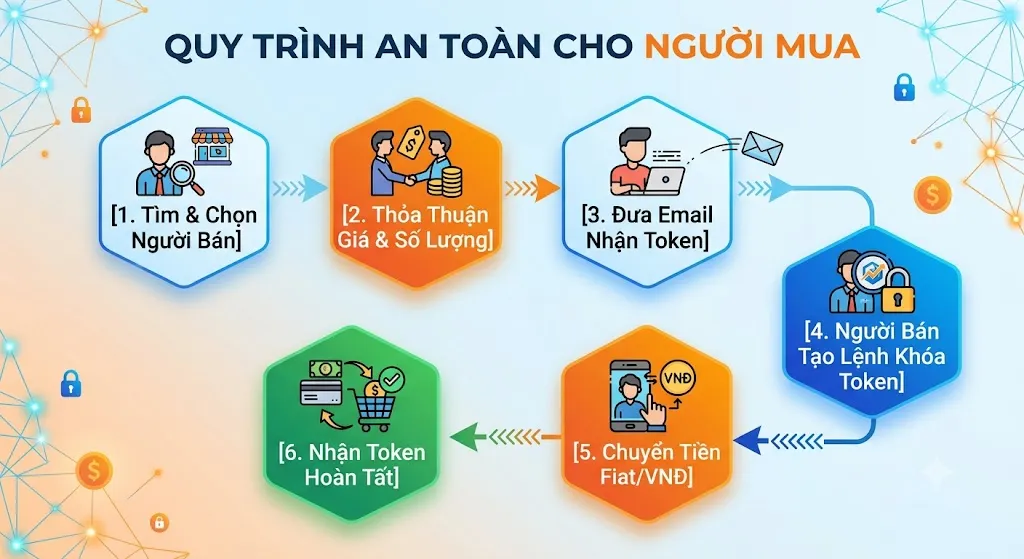
- Step 1 - Choose a trusted seller: Visit Marketplace, choose a verified seller with a blue badge who accepts your preferred payment method.
- Step 2 - Agree on terms: Contact the seller via Telegram/Zalo/Phone to agree on token amount, rate, and total price.
- Step 3 - Provide your Email: Send your registered Traffic4SEO account email address to the seller.
- Step 4 - Seller creates a "Slow Transfer" (Timed-Lock Escrow):
- Ask the seller to open Token Transfer, select Slow Transfer, enter your email, and set a holding period (e.g., 2 hours).
- The seller's tokens are immediately deducted and held in Timed-Lock Escrow (Escrowed) by the system.
- Step 5 - Verify "Escrowed" Status & Send Payment:
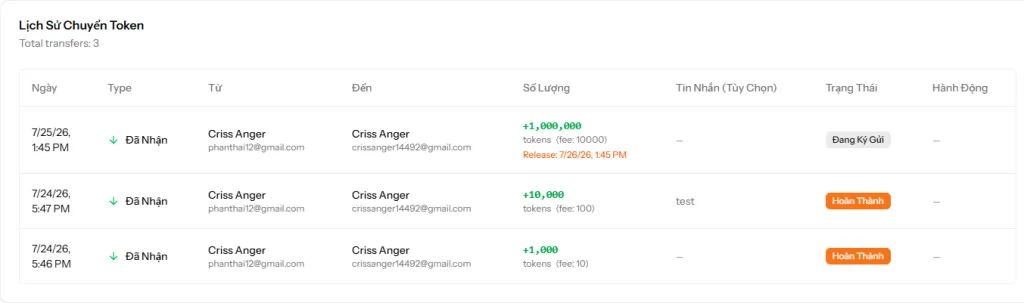
- Open the Token Transfer page (
/token-transfer) on your account, check the transfer history, and CONFIRM you see an incoming transfer from the seller with status "Escrowed". - Only after confirming that the tokens are safely locked in escrow should you transfer cash/fiat payment to the seller.
- Open the Token Transfer page (
- Step 6 - Seller clicks "Release Now" to complete:
- Once the seller verifies cash receipt, they click "Release Now" on their transfer history. Tokens are instantly credited to your account.
{success} Golden Safety Rule: NEVER send cash payment to a seller until you have logged in and verified that the token transfer status shows "Escrowed" on your own screen!
Registering as a Seller
If you earn tokens by running workflows and wish to sell them to other members, register your seller profile under Seller Settings (/settings/seller).
Required Profile Information
- Seller Name: Your brand or display name on the Marketplace.
- Short Bio: Concise service summary (under 255 characters).
- Detailed Description: Full service details, support hours, and trading terms.
- Phone & Social Links: Phone number, Telegram, Zalo, and Messenger links.
- Pricing & Minimums:
- Price / 1M Tokens: Price in VND per 1,000,000 tokens.
- Minimum Order Amount: Minimum token quantity per order.
- Accepted Payment Methods: Select P2P payment options you accept (Bank, MoMo, ZaloPay, Viettel Money, PayPal).
Profile Verification Statuses
After saving, your seller profile will undergo verification:
-
Pending -
Completed -
Failed
(Status updates automatically on your screen in real time as soon as admins take action).
Safe Token Transfer & Timed-Lock Guide
The Token Transfer page (/token-transfer) allows sending tokens to other members and managing your complete transaction history.
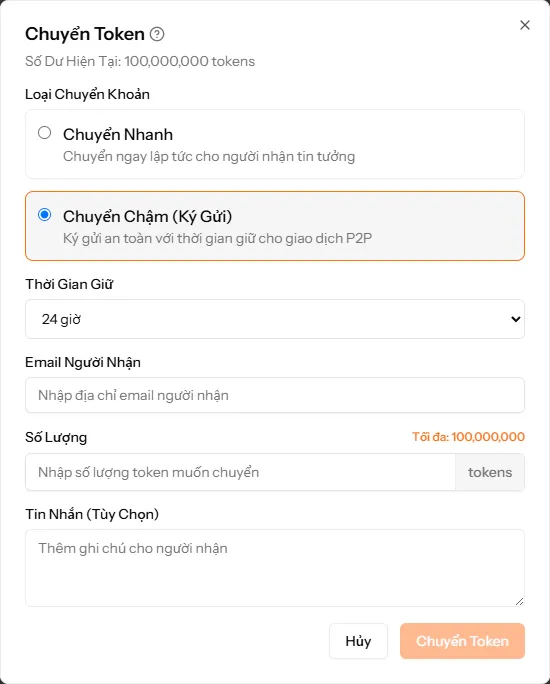
1. Two Transfer Modes
When clicking Transfer Tokens, choose between two modes:
- ⚡ Fast Transfer: Tokens are transferred instantly to the recipient. Recommended only for trusted friends or known partners.
- ⏳ Slow Transfer (Timed-Lock Escrow): Tokens are safely locked by the system for a chosen holding period (1h, 2h, 4h, 8h, 12h, or 24h). Required for trading with unknown sellers/buyers.
2. Transaction Support Features
- Real-Time Recipient Email Validation: As soon as you type the recipient's email, the system automatically checks and displays the corresponding User Name underneath to prevent sending to the wrong account.
- Max Transfer Button: Calculates the maximum transferable token amount after deducting the 1% transaction fee.
- Clear Fee Breakdown: 1% internal technical fee is calculated on the transfer amount (e.g., transferring 1,000,000 tokens incurs a 10,000 token fee).
3. Seller Management & Action Buttons
In the seller's transfer history list, for transactions in Escrowed status, interactive action buttons are available:
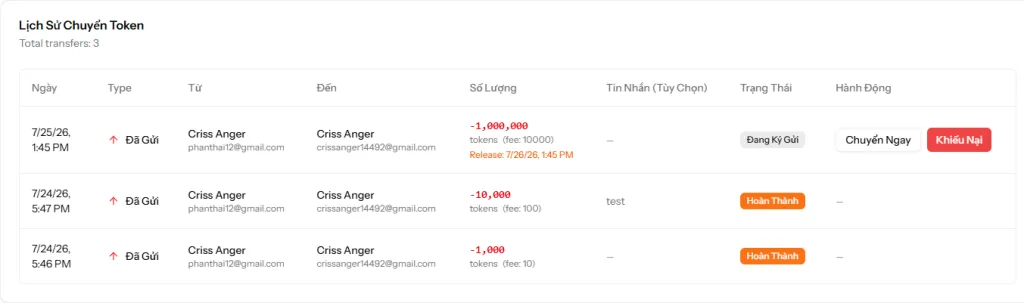
- 🔓 Release Now: Click to instantly release tokens to the recipient when payment is confirmed, without waiting for the timer to expire.
- ⚖️ Dispute: Click to pause the countdown timer and hold tokens safely if a buyer/seller commits fraud, escalating the issue to admins for resolution.
Dispute Resolution Process
If a P2P transaction encounters an issue (e.g., buyer paid but seller refuses to release tokens):
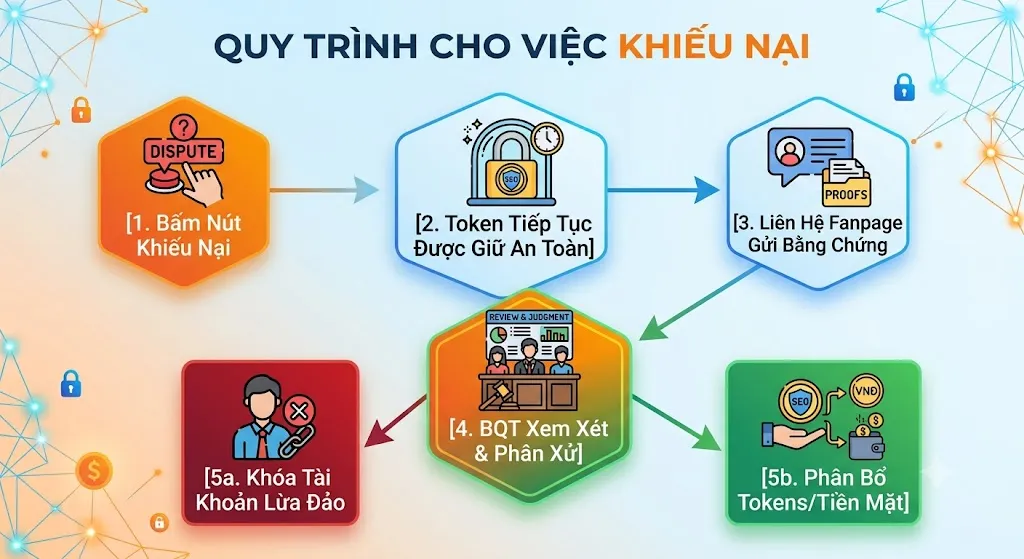
- Click Dispute: Navigate to Token Transfer history and click "Dispute" on the transaction.
- Submit Evidence to Support: Contact the official Traffic4SEO Facebook Fanpage and provide:
- Transaction ID (Transfer ID).
- Screenshots of agreement chat and cash payment receipt.
- Admin Resolution:
- Valid dispute: Tokens will be fully refunded to the victim.
- Fraudulent accounts or malicious false claims will result in permanent account bans.
📖 Related Articles: