Token System
Overview
Traffic4SEO uses an internal utility point system to create a fair marketplace for exchanging SEO technical execution between workflow owners and executors.
Tokens within the system are internal technical/electronic indices (Utility Points/Credits) representing usage limits for automation tools on the platform. Tokens are not money, financial assets, or cryptocurrencies.
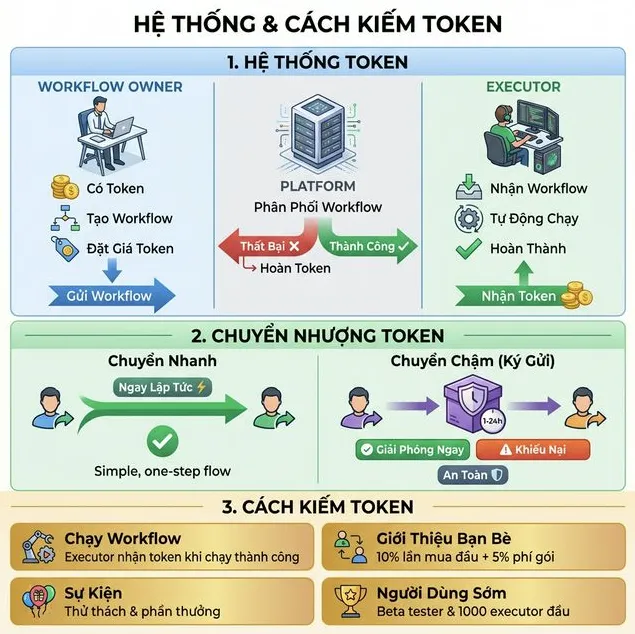
Core Principles
- Workflow Owners: Use tokens to execute SEO automation workflows
- Executors: Earn tokens by executing workflows on their computers
- Platform: Ensures fair transactions through a technical timed-lock feature (Technical Timed-lock)
How It Works
For Workflow Owners
- Subscribe to Subscription Plans (receive bonus tokens) or earn tokens via workflow execution / referring friends
- Create workflow using drag-and-drop tools
- Tokens automatically deducted when an executor accepts the task
- Receive token refund if the executor fails to complete the task
For Executors
- Install application on your computer (Traffic4SEO App (Desktop) or Traffic4SEO CLI)
- Register machine with the system
- Keep machine on to receive workflows
- Automatic execution when a new workflow arrives
- Receive tokens upon successful execution
Token Transfer
🛒 Token Marketplace Guide: For detailed instructions on finding sellers, registering a seller account, and the 6-step safe buying guide, please read the Token Marketplace Documentation.
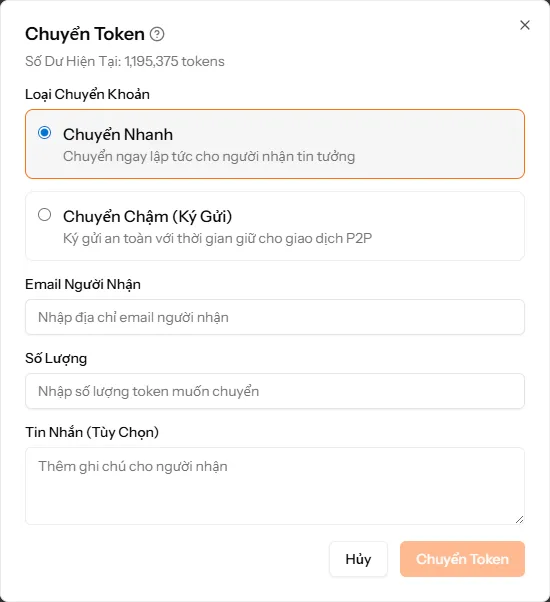
The system supports multiple forms of technical token transfer between users:
Transfer Types
1. Quick Transfer - Immediate transfer to trusted recipients
Sender → Recipient (immediately)Suitable when transferring to friends or known partners. Tokens are transferred instantly and cannot be undone.
2. Slow Transfer (Technical Timed-lock) - Secure holding with technical timed-lock duration for P2P transactions
Sender → Technical Timed-lock Token System → Recipient (after time expires)Suitable for exchange transactions with strangers. Tokens are held technically secure by the system until both parties confirm or the timer expires.
How to Transfer Tokens
- Go to the Token Transfer page from the menu
- Click the "Transfer Tokens" button to open the dialog
- Select Transfer Type:
- Quick Transfer: For acquaintances, immediate transfer
- Slow Transfer: For P2P transactions, with protected timed-lock protection
- Enter Recipient Email (must be a registered account)
- Enter Amount of tokens to transfer
- Add a Message (optional) as a note for the recipient
- Click "Transfer Tokens" to complete
{info} Internal Technical Transaction Fee: The system calculates and deducts a 1% (or 2%) fee strictly in internal Tokens per transaction to maintain and operate technical infrastructure. The platform strictly collects ZERO commission fees in cash/fiat for direct P2P transactions agreed between users outside the system.
{warning} P2P Disclaimer & Tax Obligations: The platform purely provides listing information infrastructure (Listing Platform) and P2P technical transfer tools. The platform is not a cash payment escrow and does not charge percentage commission fees on P2P user transactions. All transactions are voluntary civil agreements; sellers/transfers are solely responsible for legal obligations and paying applicable taxes (VAT, Personal Income Tax) under local laws. All agreed transactions between Users are voluntary civil transactions, and the parties are solely responsible for declaring and fulfilling their personal tax obligations (such as Value Added Tax - VAT, Personal Income Tax - PIT) under applicable local laws.
Technical Timed-lock Escrow System
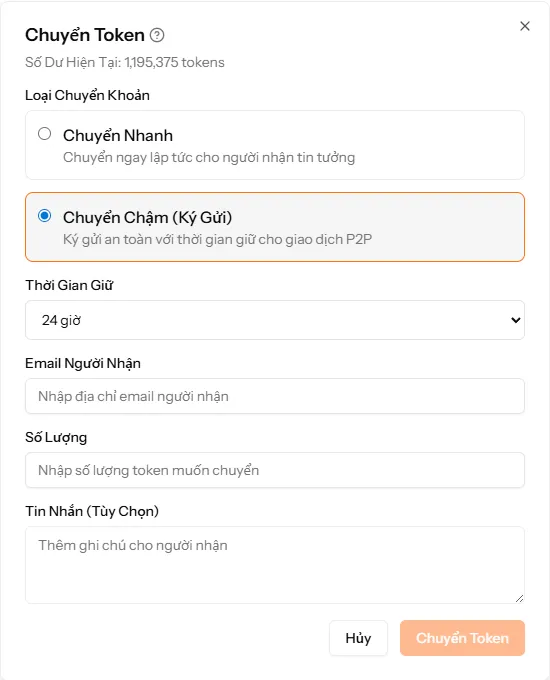
The technical timed-lock escrow system helps protect users' tool usage limits and allows both parties to inspect technical work in P2P transactions. This is purely a technical timer lock feature on the system infrastructure, not a money/fiat payment escrow service or financial funds management service.
How Slow Transfer Works
When you choose Slow Transfer (Technical Timed-lock), tokens are held securely in the system:
1. Sender selects "Slow Transfer" and chooses holding time
   ↓
2. Tokens are deducted from sender's account and technically locked in the system
   ↓
3. Tokens are held for the selected technical lock duration (1-24 hours)
   ↓
4. After time expires, tokens are automatically transferred to recipient's account
{success} Technical Protection: Tokens are held in the system and automatically transferred to the recipient after the technical lock period ends, or the sender can release them immediately!
Holding Time
You can choose the duration for which tokens are held in the system:
- 1 hour - Fast transaction, low risk
- 2 hours - Medium transaction
- 4 hours - Transaction requiring verification time
- 8 hours - Daily transaction
- 12 hours - Overnight transaction
- 24 hours - Transaction requiring the longest time
{info} Note: The longer the holding time, the more time you have to inspect technical work before the system automatically completes the token transfer.
Immediate Release
If the transaction goes well, the sender can release tokens immediately before the holding time expires:
- Go to the Token Transfer History page
- Find the transaction in "Escrowing" (Technical Lock) status
- Click the "Transfer Now" button
- Tokens will be transferred to the recipient immediately
Transaction Disputes
If there is a technical issue with a transaction (e.g., execution work does not meet agreed requirements), the sender can file a dispute:
Dispute Process
- Click the "Dispute" button on the escrowed transaction
- Tokens will be temporarily held technically and will not automatically transfer to the recipient
- Status changes to "Disputed"
- Contact via Facebook at the Traffic4SEO Fanpage
- Provide Evidence:
- Screenshots of conversations
- Transaction / workflow execution logs
- Detailed description of the problem
- Recipient Response: Has 48 hours to provide an explanation
- Administrator Review: The team reviews all evidence from both sides
- Conclusion: Decision to refund tokens or release tokens
Possible Outcomes
- ✅ Full Token Refund: Recipient clearly violated technical agreement, tokens + technical fees are refunded to the sender
- ⚠️ Partial Token Refund: Both parties are at fault, tokens are split proportionally
- ❌ No Token Refund: Sender's dispute is invalid, tokens are transferred to the recipient
- 🚫 Account Suspension: Repeatedly filing false disputes will result in a permanent account ban
{warning} Warning: Only file a dispute when there is a genuine technical problem. Filing false disputes can lead to account suspension!
Earning Tokens
1. Executing Workflows
This is the primary way to earn tokens by running automated workflows using Traffic4SEO App (Desktop) or Traffic4SEO CLI:
- Download and install the application from the Download Page
- Run workflows using Traffic4SEO App (Desktop) or Traffic4SEO CLI
- Register and activate instances
- Workflows will be executed automatically
- Receive tokens after each successful execution
- More instances = More income
📖 Application Guides & Download Links:
2. Referral Program
Refer friends and earn commissions:
- 10% commission from a friend's first Subscription Plan purchase
- 5% from Subscription Plan renewal fees (lifetime)
- Unlimited number of referrals
Your Link → Friend Registers → They Subscribe to Subscription Plan → You Receive Commission3. Promotional Events
Participate in events to earn extra tokens:
- Platform challenges
- Rewards for beta testers
- Bonuses for active users
4. Early User Rewards
- Beta testers: Receive bonus tokens
- First 1000 executors: Receive 10,000 free tokens