Getting Started with Traffic4SEO
Account Registration
Step 1: Access the registration page
Visit traffic4seo.com/register and fill in your details:
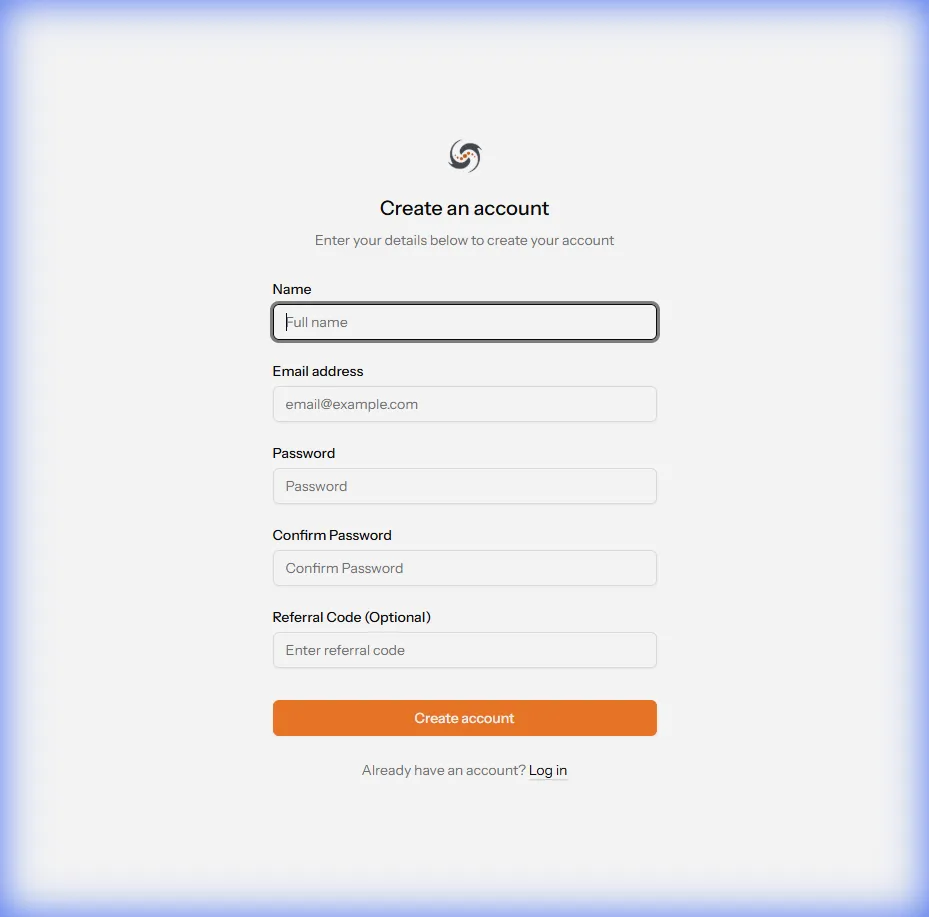
- Email: A valid email (used for login and notifications)
- Name: Your display name
- Password: Minimum 8 characters, should include uppercase, numbers, and special characters
{info} Email Verification: Check your inbox to verify your email after registering.
Step 2: Verify Email
- Check your email (including the spam folder)
- Click the verification link
- Log in to your account
Step 3: Security Setup (Recommended)
Enable Two-Factor Authentication (2FA):
- Go to Settings → Security
- Click Enable 2FA
- Scan the QR code with Google Authenticator or Authy
- Enter the 6-digit code to confirm
- Save recovery codes in a safe place
{danger} Important: Recovery codes are the only way to access your account if you lose your phone. Print them or save them in a password manager!
Choose a Plan
Traffic4SEO offers 3 plans tailored to different needs:
Free Plan
✅ Best for: Beginners, testing the waters
Limits:
- 5 workflows
- Maximum 10 nodes per workflow
- Maximum 15 minutes wait time
- 3 running instances
Features:
- ❌ No country targeting
- ❌ No device emulation
Price: Free Forever
Basic Plan
✅ Best for: Individuals, freelancers, small businesses
Limits:
- 40 workflows
- Maximum 20 nodes per workflow
- Maximum 30 minutes wait time
- 10 simultaneous running instances
Features:
- ✅ Country targeting
- ✅ Device emulation (Desktop/Mobile/Tablet)
- ✅ Bonus 1,000,000 tokens per month
Price:
- Monthly: $5/month (100,000 VND)
- 6 Months: $25/6 months (500,000 VND) - Save 17%
- Yearly: $45/year (900,000 VND) - Save 25%
Pro Plan
✅ Best for: Agencies, power users, SEO professionals
Limits:
- 100 workflows
- Maximum 50 nodes per workflow
- Maximum 60 minutes wait time
- 100 simultaneous running instances
Features:
- ✅ Country targeting
- ✅ Device emulation
- ✅ Bonus 2,000,000 tokens per month
- ✅ Only run your own workflows (executor mode)
Price:
- Monthly: $10/month (200,000 VND)
- 6 Months: $50/6 months (1,000,000 VND) - Save 17%
- Yearly: $90/year (1,800,000 VND) - Save 25%
Plan Comparison
| Feature | Free | Basic | Pro |
|---|---|---|---|
| Workflows | 5 | 40 | 100 |
| Nodes/Workflow | 10 | 20 | 50 |
| Wait Time | 15 min | 30 min | 60 min |
| Running Instances | 3 | 10 | 100 |
| Country Targeting | ❌ | ✅ | ✅ |
| Device Emulation | ❌ | ✅ | ✅ |
| Executor Mode | ❌ | ❌ | ✅ |
| Bonus Tokens/Month | 0 | 1,000,000 | 2,000,000 |
| Price (USD) | Free | $5-45 | $10-90 |
How to Upgrade Your Plan
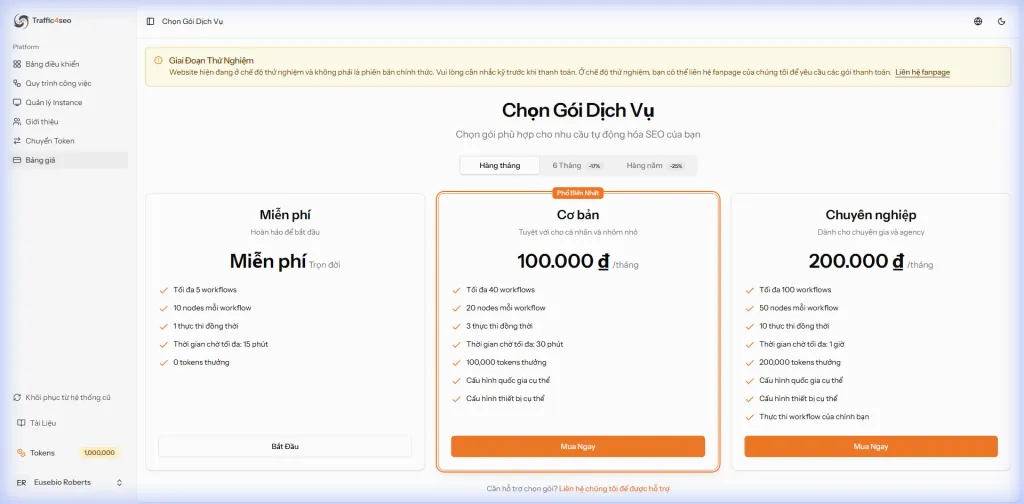
- Go to Dashboard → Pricing
- Choose the suitable plan (Basic or Pro)
- Select the billing period:
- Monthly: Pay monthly, flexible cancellation anytime
- 6 Months: Save 17%, one-time payment for 6 months
- Yearly: Save 25%, one-time payment for the whole year
- Click Buy Now
- Scan the QR code and pay using a bank app or e-wallet
- The plan is activated immediately after successful payment
{success} Maximize Savings: Choose the Yearly billing period to save 25% and receive bonus tokens every month!
Get Tokens
What are Tokens?
Tokens are the currency in Traffic4SEO:
- Workflow owners use tokens to pay executors
- Executors earn tokens by running workflows
How to get Tokens
1. Buy a Plan and Receive Bonus Tokens
When you upgrade your plan, you will receive bonus tokens every month:
| Plan | Bonus Tokens/Month |
|---|---|
| Free | 0 tokens |
| Basic | 1,000,000 tokens |
| Pro | 2,000,000 tokens |
{success} Best Way: Upgrade to Basic or Pro to receive free bonus tokens every month!
2. Earn Tokens by Running Workflows
- Download and install the Desktop App
- Let the app run in the background and earn tokens automatically
- Receive tokens immediately after each successful workflow
3. Buy Tokens from the Community
The system does not support buying tokens directly to foster community growth.
How to buy from the community:
- Join the Traffic4SEO Facebook Group (link in Dashboard)
- Post a request for token sellers
- Agree on a price with the seller
- The seller will use the Transfer Tokens feature to transfer them to you
- Pay the seller as agreed
{info} Safety: Use the Escrow Transfer feature to protect both parties during token transactions.
{warning} Note: Only trade with reputable people in the Group. Traffic4SEO is not responsible for transactions outside the system.
For Workflow Owners
Want to create workflows to increase traffic to your website? Follow these steps:
1. Prepare Tokens
To run workflows, you need tokens. There are 3 ways:
- Upgrade Plan: Receive bonus tokens every month (Basic: 1M, Pro: 2M tokens)
- Earn Tokens: Download the Desktop App and run others' workflows
- Buy from the Community: Join the Facebook Group to find sellers
{info} Recommendation: Upgrade to the Basic Plan to receive 1,000,000 tokens/month and test your workflows.
See details: How to get Tokens
2. Create and Configure Workflow
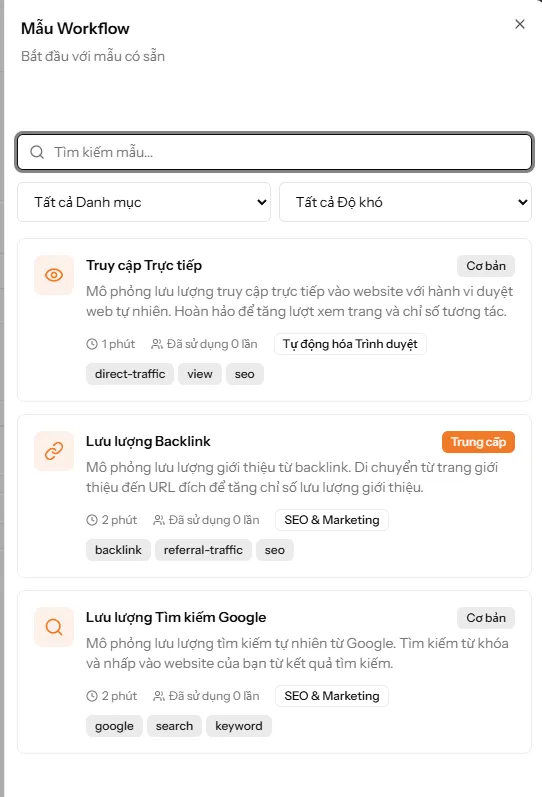
Easiest way: Use an existing template (Recommended for beginners)
- Go to Workflows → Create New
- Click the "Workflow Templates" button at the top
- Choose a suitable template:
- Google Search Traffic: Search for keyword → Click on website (Recommended)
- Direct Access: Direct visit with natural behavior
- Backlink Traffic: From referral page → target URL
- Customize the template:
- Change URL and keywords to match your website
- Adjust Wait times if needed
- Name the workflow (e.g., "Google → MyWebsite.com")
- Configure workflow settings:
- Priority: 1-10 (default 1)
- Device type: Desktop, Mobile, Tablet (or all)
- Country targeting: Choose country (Basic/Pro Plan only)
- Rate limits: Limit runs per hour/day/total
- Click Save
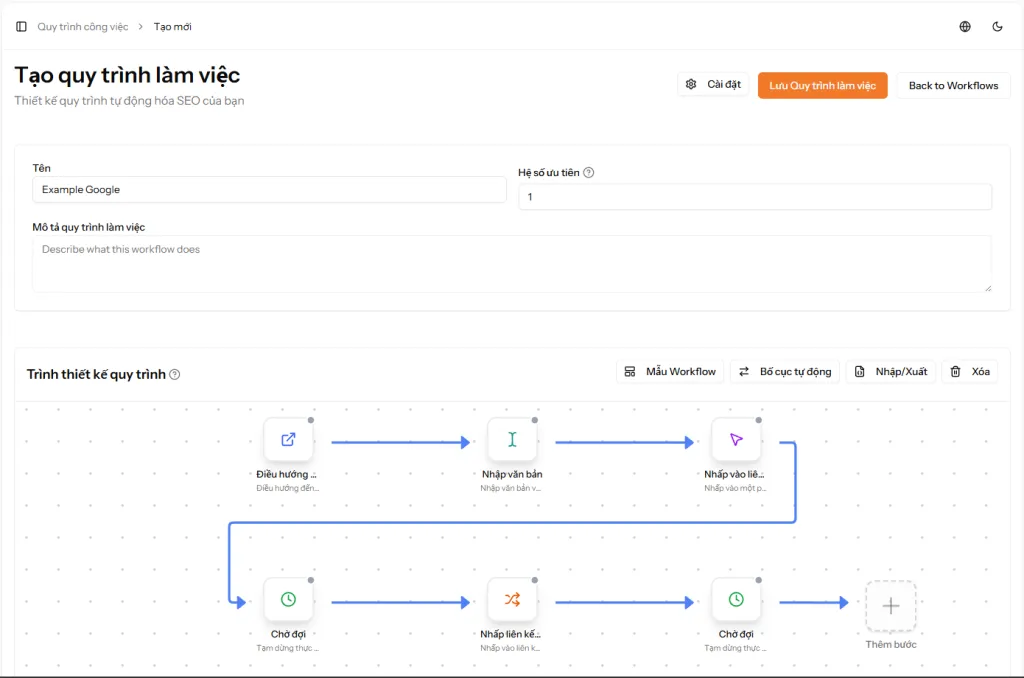
{success} Workflow Active Immediately: The workflow is saved in Active status and can run immediately. You can pause it anytime if needed.
{info} Advanced: You can also create a workflow from scratch by dragging and dropping actions. See detailed instructions in the Workflow Guide
📖 See details: Create Workflow - Full Guide
3. Test the Workflow (Recommended)
Recommendation: Always test your workflow to ensure it works correctly!
Requirement: Install the Desktop App on your computer
Steps:
- In the workflow editor, click the "Test Run" button
- The Traffic4SEO app will automatically open on your computer
- The app executes the workflow, and you will see the browser automatically performing the steps
- Check logs in the app for errors
- If there are errors, return to the editor and fix the workflow
- Test again until the workflow runs correctly
{warning} Note: The "Test Run" button is for testing only, does not cost tokens, and is not assigned to other executors.
4. Pause or Let It Run
The workflow is created in Active status:
If you want to let it run immediately:
- No further action needed
- The workflow is ready in the queue
- Executors will start receiving and running the workflow
- Tokens will be deducted automatically when someone runs it
If you want to pause:
- Go to the workflow detail page
- Click the "Pause" button (Inactive)
- The workflow will no longer be assigned to executors
- Can be reactivated at any time
{info} Automatic Cost Calculation: The system automatically calculates tokens based on the actions in the workflow. For example: Url Goto (30) + Wait (10-20) + Click (30) = 70-80 tokens/run. The actual cost is deducted when the workflow starts running.
5. Monitor Results
View overview of all workflows:
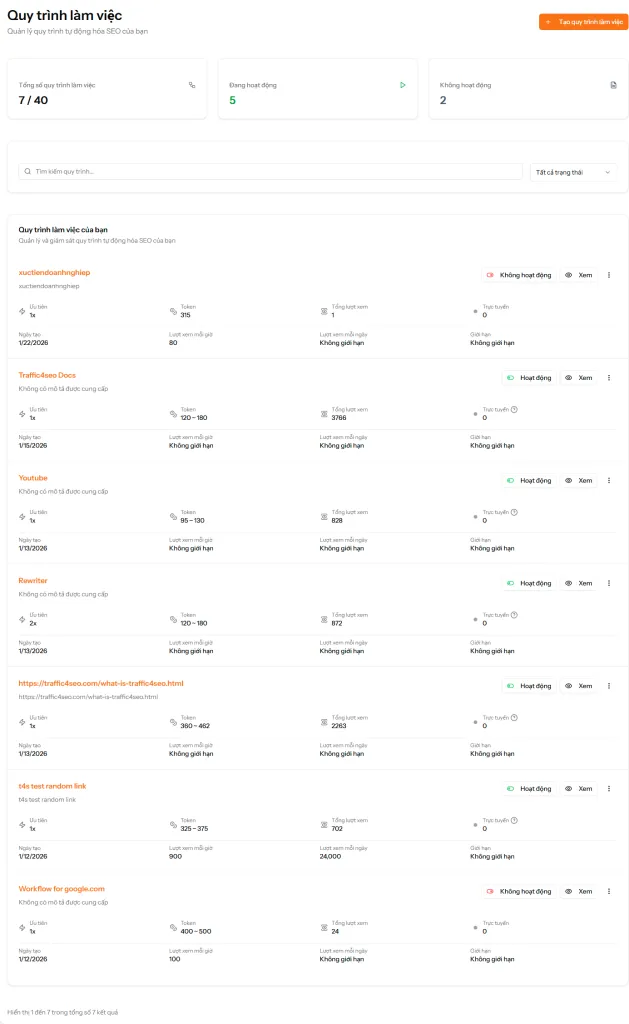
Go to Workflows to see:
- Total Workflows: Number of created workflows / plan limit (e.g., 7/40)
- Active: Number of active workflows (shown in green)
- Inactive: Number of paused workflows (shown in red)
- Workflow list with details:
- Workflow name and description
- Number of executions
- Tokens used
- Views per hour/day
- Limit settings
- Creation date
- Status (Active/Inactive)
- View button for details
For Executors
Want to earn tokens by running workflows? Follow these steps:
1. Download and Install Desktop App
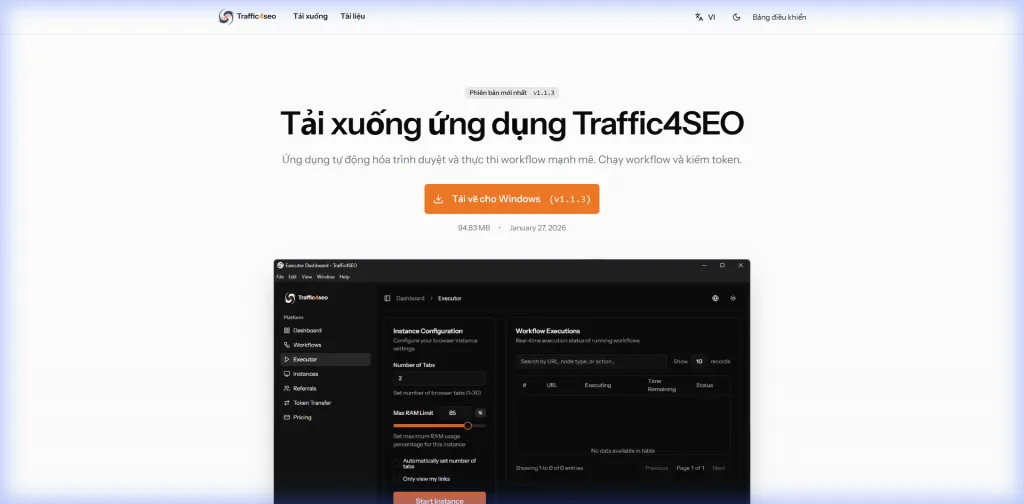
{info} Operating System: Currently, the Traffic4SEO App only supports Windows 10/11 (64-bit). macOS and Linux support will be developed in the future.
System Requirements:
- Windows 10/11 (64-bit)
- RAM: 4GB (8GB recommended)
- Disk Space: 2GB free
- Stable internet connection
Installation Steps:
- Download the
Traffic4SEO-Setup-{version}.exefile from the download page - Double-click the installation file
- If Windows SmartScreen warns you:
- Click "More info"
- Click "Run anyway"
- Choose the installation directory and click "Install"
- Wait 30-60 seconds for the installation to complete
- Click "Finish" to complete
{success} Shortcuts: The app will create shortcuts on your Desktop and Start Menu for easy access.
📖 See details: Full Installation Guide
2. Open App and Log In
Open application:
- Double-click the Traffic4SEO icon on your desktop
- Or:
Start Menu > Traffic4SEO
Login:
- The app will display a login window
- Enter your Traffic4SEO account email and password
- Click "Log In"
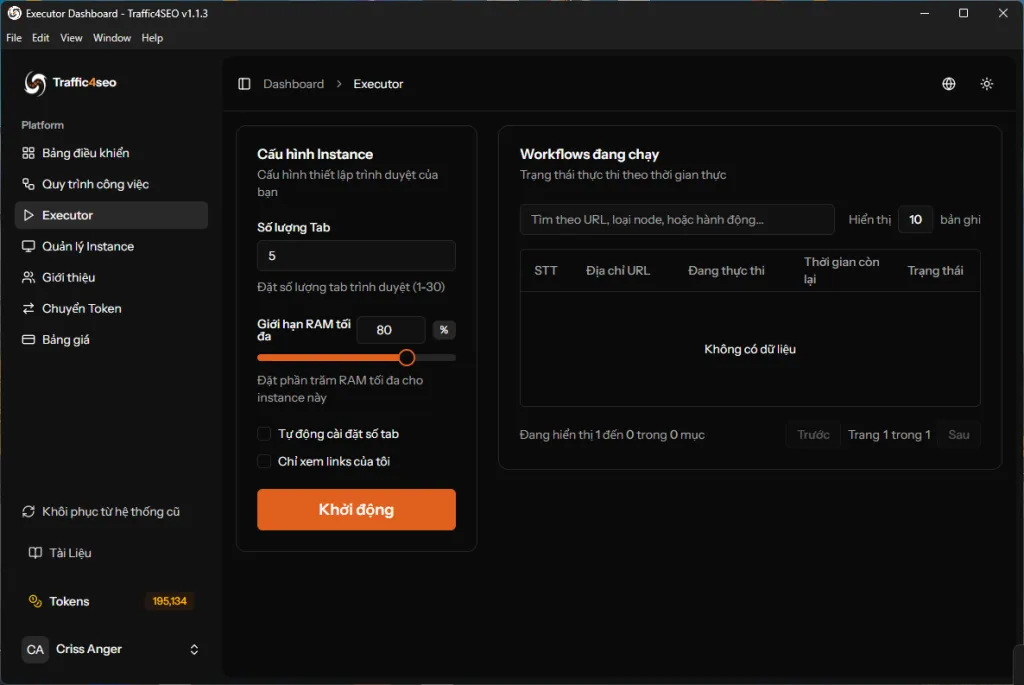
{info} Account: You must have a Traffic4SEO account first. If you don't have one, register at traffic4seo.com/register
3. Start Earning Tokens
- Click the "Start Executor" button (green)
- The instance will:
- Connect to the workflow queue
- Automatically poll workflows from the server (every 10-15 seconds)
- Receive suitable workflows (based on device type, country, etc.)
- Execute workflows in a hidden browser
- Send results to the server
- Receive tokens immediately upon success
- Monitor progress in the "Running Workflows" table
{success} Passive Earning: Let the app run in the background 24/7 to earn tokens automatically. The app is fully automated!
4. Track Earnings
Go to the Dashboard to see details:
- Tokens earned: Total tokens earned from all instances
Tips & Best Practices
For Workflow Owners
✅ DO:
- Test workflows thoroughly before activating
- Set reasonable token amounts (not too low to attract executors, not too high to be wasteful)
- Monitor success rate, if low then fix the workflow
- Use wait nodes to avoid bot detection
❌ DON'T:
- Create spam or illegal workflows
- Set prices too low (< 2 tokens) → executors won't be interested
- Create overly complex workflows → high failure rate
For Executors
✅ DO:
- Leave the app running 24/7 to maximize earnings
- Use proxies to increase the number of instances (one IP → one instance)
- Update the app regularly
- Run on stable machines/VPS
❌ DON'T:
- Close the app while a workflow is running → causes disputes
- Interfere with the browser while the app is running
- Use unstable VPNs/proxies