Notification Center & Web Push Notifications
- Overview
- Multi-Tier Notification System
- How to Enable Web Push
- Configuring 6 Event Categories & 3 Delivery Modes
- Unblocking Notification Permissions When Denied
- Frequently Asked Questions (FAQ)
Overview
The Traffic4SEO Notification Center is a unified real-time alert and communication hub designed to keep you updated on all critical events across the platform: from worker machine (instance) connectivity and token transfers to SEO workflow completion, subscription renewals, and account security.
Featuring a Multi-Channel Architecture and VAPID-compliant Web Push Protocol (RFC 8292), the system ensures you never miss high-priority alerts even when your browser tab is closed or your mobile device is locked.
{info} Key Benefits:
- Receive instant real-time alerts powered by WebSockets.
- Receive native Web Push notifications across Windows, macOS, Linux, Android, and iOS 16.4+ (via PWA).
- Granularly customize delivery preferences across 6 distinct business categories.
- Securely store notification history with intelligent unread filters and multi-device synchronization.
Multi-Tier Notification System
Traffic4SEO employs a 3-tier delivery model to provide timely updates without disrupting your workflow:
┌─────────────────────────────────────────────────────────────────────────┐
│                   TRAFFIC4SEO NOTIFICATION SYSTEM                       │
├───────────────────┬────────────────────────────┬────────────────────────┤
│   TIER 1: IN-APP  │       TIER 2: DRAWER       │    TIER 3: WEB PUSH    │
│   (Sonner Toast)  │    (Notification Sheet)    │   (Service Worker OS)  │
├───────────────────┼────────────────────────────┼────────────────────────┤
│ • Instant alert   │ • Complete history log     │ • Direct OS push alert │
│ • Active web tab  │ • Unread badge count       │ • Even when tab closed │
│ • Auto-dismisses  │ • Mark all read / Delete   │ • Supports Desktop/PWA │
│ • Quick action    │ • Infinite scroll loading  │ • Click to open target │
│   navigation link │ • Relative timestamps      │   destination page     │
└───────────────────┴────────────────────────────┴────────────────────────┘
1. In-App Toast (Immediate Floating Alerts)
While actively working inside the Traffic4SEO web application, new events appear instantly as floating toast banners in the corner of your screen. Each toast contains a summary and a quick-action link leading directly to the relevant resource.
2. Notification Drawer Sheet (Slide-Out Right Panel)
The Bell icon (Bell) in the header bar displays your current unread notification count. Clicking the bell opens a slide-out drawer containing your full notification history, featuring:
- All / Unread Filter Tabs: Quickly isolate notifications requiring your attention.
- Mark All as Read: Clear unread badges with a single click.
- Relative Timestamps: Human-readable time indicators (e.g., just now, 5 minutes ago, 2 hours ago) with exact datetime hover tooltips.
- Contextual Navigation: Click on any notification card to jump directly to the relevant dashboard page (Instances, Token Transfers, Workflow logs, etc.).
3. Service Worker Web Push (Native OS Background Notifications)
Powered by background Service Workers and modern cryptographic VAPID encryption, notifications are dispatched directly to your operating system notification center (Windows Action Center, macOS Notification Center, Android Tray, iOS Lock Screen) even when your browser is closed.
How to Enable Web Push
On Desktop (Windows, macOS, Linux)
Supported on all modern browsers: Google Chrome, Microsoft Edge, Mozilla Firefox, Brave, and Apple Safari 16+.
- Log into your Traffic4SEO account.
- Navigate to Notification Settings or open the Notification Drawer Sheet from the header.
- Switch the Browser Push Notifications (Web Push) toggle to ON.
- When your browser displays the permission prompt, click "Allow".
- The system automatically registers the Service Worker and encrypts your device push subscription endpoint with the server.
{success} Success: Important notifications will now appear in your OS notification center just like a native desktop app!
On Mobile & Tablet (Android & iOS PWA)
1. For Android Devices (Chrome, Edge, Firefox, Samsung Internet)
- Open your mobile browser and visit the Traffic4SEO platform.
- Sign in and navigate to Notification Settings.
- Toggle Browser Push Notifications to ON.
- Tap "Allow" when Android requests notification permissions.
2. For iPhone & iPad (iOS / iPadOS 16.4+ via Apple PWA)
Apple requires web applications to be installed as a Progressive Web App (Add to Home Screen) to deliver Web Push notifications:
Step 1: Open Safari → Go to Traffic4SEO
  ↓
Step 2: Tap the "Share" button (Square with arrow pointing up in toolbar)
  ↓
Step 3: Scroll down and select "Add to Home Screen" → Tap "Add"
  ↓
Step 4: Return to your Home Screen → Open the new Traffic4SEO App icon
  ↓
Step 5: Navigate to Notification Settings → Turn ON Web Push → Tap "Allow"
{warning} iOS Requirement: If accessed via regular Safari browser tabs without adding to Home Screen, iOS will block Web Push subscriptions due to Apple security policies.
Configuring 6 Event Categories & 3 Delivery Modes
Traffic4SEO allows you to customize delivery channels for each specific event source under Notification Settings:
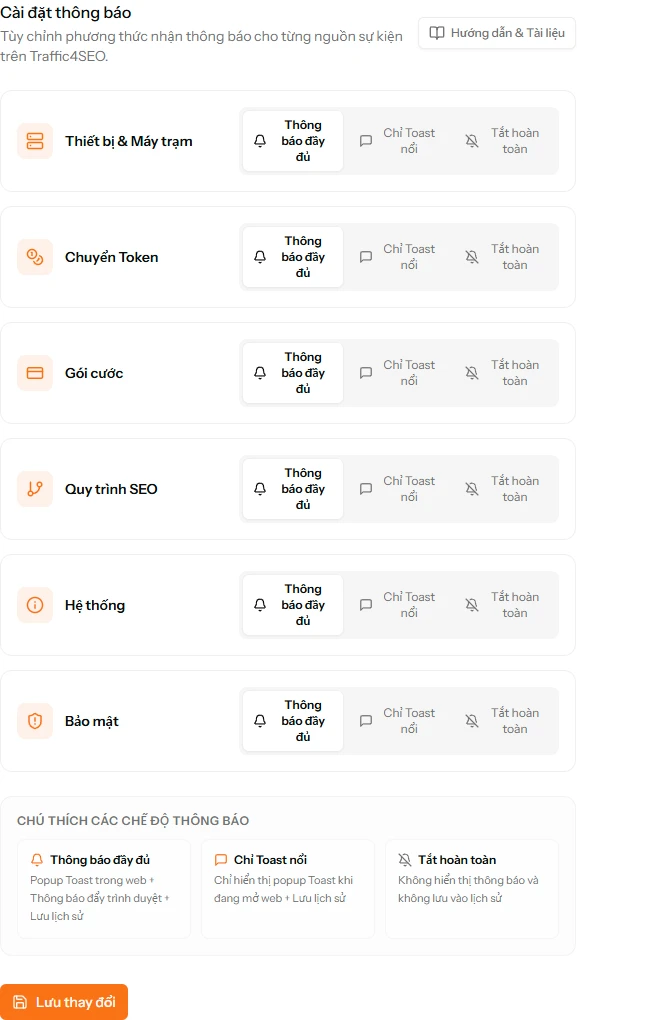
6 Core Event Categories
| Category | Icon | Typical Event Triggers |
|---|---|---|
| Worker Machines (Instances) | 🖥️ Server | Machine disconnected (Offline), machine reconnected (Online), app version sync alerts. |
| Token Transfers & Deposits (Token Transfers) | 🪙 Coins | Tokens received from another user, successful token transfers, timed-lock escrow alerts, P2P dispute updates. |
| Plans & Subscriptions (Subscriptions) | 💳 Credit Card | Subscription expiration reminders (3 days / 1 day prior), successful renewals, plan upgrade confirmations. |
| SEO Automation (Workflows) | 🔀 Git Branch | Workflow completed target execution quota, workflow execution errors, script validation warnings. |
| System Announcements (System) | 📢 Megaphone | Scheduled maintenance notices, new platform feature releases, bonus token campaigns. |
| Security & Accounts (Security & Auth) | 🛡️ Shield Alert | Logins from new IP addresses/devices, password changes, API token generation or revocation. |
3 Flexible Delivery Modes
For each category above, you can choose one of three delivery modes:
- Full Notifications (Recommended):
- Immediate in-app toasts while browsing.
- Preserved in Notification Center history.
- Out-of-browser Web Push alerts to desktop and mobile devices.
- Toast Only (In-App Only):
- Displays toast alerts and records history only while active on the web app.
- Disables OS background Web Push when the browser tab is closed.
- Mute / Off (Completely Disabled):
- Silences all toast alerts and Web Push notifications for this category.
Unblocking Notification Permissions When Denied
If you accidentally clicked "Block" / "Deny" or your browser disabled notification permissions automatically, follow these steps to restore them:
1. On Google Chrome / Microsoft Edge / Brave
- Look at the browser address bar (to the left of
traffic4seo.com). - Click the Site Settings / Lock icon.
- Locate the Notifications row.
- Change the dropdown from Block to Allow.
- Refresh the page (
F5) and re-enable Web Push in Notification Settings.
2. On Apple Safari (macOS)
- Open the top Safari menu and select Settings... (or press
Cmd + ,). - Click the Websites tab → select Notifications from the left sidebar.
- Locate the Traffic4SEO domain in the list and set permission to Allow.
3. On Mozilla Firefox
- Click the Lock / Permissions icon in the address bar.
- Under Permissions → Send Notifications, click the
✕next to "Blocked" to clear the restriction. - Refresh the page and grant permission when prompted.
4. On Mobile Devices
- Android: Go to
Device Settings→Apps→ select your browser (Chrome) →Notifications→ verify site notifications are enabled for Traffic4SEO. - iPhone / iPad (PWA): Open iOS
Settings→ scroll down and tap theTraffic4SEOapp icon → selectNotifications→ turn on Allow Notifications.
Frequently Asked Questions (FAQ)
Does Web Push drain battery or mobile data?
No. Web Push utilizes native OS push daemons (Google FCM, Apple APNs, Mozilla Push Service) integrated at the operating system kernel level. It consumes negligible memory and only transfers a few kilobytes when a notification arrives.
Can I receive notifications across multiple devices simultaneously?
Yes. Traffic4SEO supports Multi-Device Subscriptions. You can receive alerts on your work laptop, home desktop, and mobile phone simultaneously.
Why am I not receiving Web Push alerts on Desktop even after enabling?
Please check the following system settings:
- Ensure Focus Assist (Windows) or Do Not Disturb / Focus (macOS) is not suppressing incoming banners.
- Verify that your browser application (Chrome/Edge) has notification permissions enabled in Windows/macOS System Settings.
- Confirm that the specific event category in your Traffic4SEO Notification Settings is set to
Full Notificationsrather thanToast OnlyorMute.